

When the smart device cannot connect to the router, please troubleshoot as follows:
1. ) Make sure your phone's bluetooth is turned on
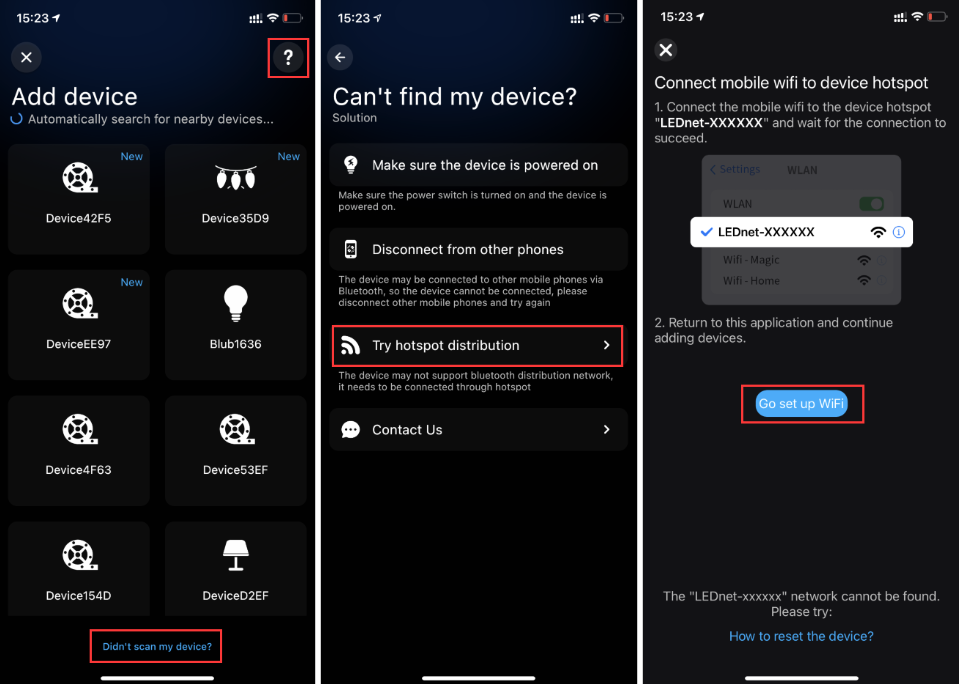
2. ) After entering the add device interface, if my device is not found, please try the following methods:
A. Restart the device and make sure the phone is as close as possible to the device
B. The device may not support Bluetooth distribution network, try to use the device hotspot distribution network
3.) After entering the Wi-Fi list, I cannot find my Wi-Fi network, please try the following methods:
A. It is possible that the router is too far from the device or there is a partition wall to affect the signal, please try to place the two as close as possible
B. Try to pull down to refresh the list
C. Try to select "Other Network" and enter your WIFI name and password.
4. ) If the problem still exists through the above methods, please click "Profile" at the bottom right of the main page of the APP, select "Support", and contact customer service for help through online feedback.
Thanks!
